Videographer Portfolio Website: Win Clients in 2026
 Elitza Vasileva

You've probably got the raw material already. A drive full of finished edits. A few client pieces you're proud of. Maybe a wedding highlight that still lands emotionally, a clean product spot, a music video with sharp pacing. But when a prospect asks for your site, you send a folder, an Instagram profile, or a random Vimeo link.
That's the gap.
A videographer portfolio website isn't just where you display work. It's where a client decides whether you look like someone they can trust with budget, deadlines, and brand risk. Good footage alone doesn't close jobs. Good footage presented in the right order, with the right framing, and a clear next step does.
Table of Contents
- Why Your Hard Drive Is Not a Portfolio
- The Foundation Planning Your Portfolio Strategy
- Designing Core Pages for Maximum Impact
- Optimizing and Embedding Video The Technical Details
- Launching and Growing Your Online Presence
- Build Your Portfolio in Minutes with own.page
Why Your Hard Drive Is Not a Portfolio
A hard drive stores projects. A portfolio wins work. Those are not the same thing.
Clients don't hire based on what you've made in private. They hire based on what they can review quickly, understand instantly, and share with the other decision-makers involved. If your best work lives in folders called “Final_v8_REALFINAL,” it might as well not exist from a sales perspective.
That matters even more now because video demand isn't niche anymore. In 2025, 89% of businesses globally use video marketing, and 93% of video marketers say video marketing has delivered good ROI according to Wix's 2025 video marketing statistics. That means more companies are buying video, but it also means they expect to evaluate creatives fast. They're not going to chase you for links or ask for a tour of your Dropbox.
Practical rule: If a client can't understand what you shoot, who you serve, and how to contact you in under a minute, your site isn't helping you book work.
Most freelancers still think of a portfolio as an art archive. Clients treat it like a screening tool. They want answers to practical questions. Can this person shoot our kind of project? Do they understand our market? Are they polished enough to trust with a real deadline? Do they look easy to work with?
That's why a proper site beats social media alone. Instagram can show style. YouTube can show reach. Neither does the whole sales job as cleanly as a portfolio site you control. Your own site lets you sequence attention. Reel first. Proof second. Services and niche context third. Contact path always visible.
If you need inspiration for how other creatives present work online, this collection of creative portfolio examples is useful for studying structure, not just aesthetics.
The shift you need to make is simple. Stop asking, “How do I show everything I've made?” Start asking, “What does a paying client need to see before they inquire?”
That one question changes the whole build.
The Foundation Planning Your Portfolio Strategy
A strong portfolio starts before design. If you skip strategy, you end up with a site that looks polished but sends mixed signals.
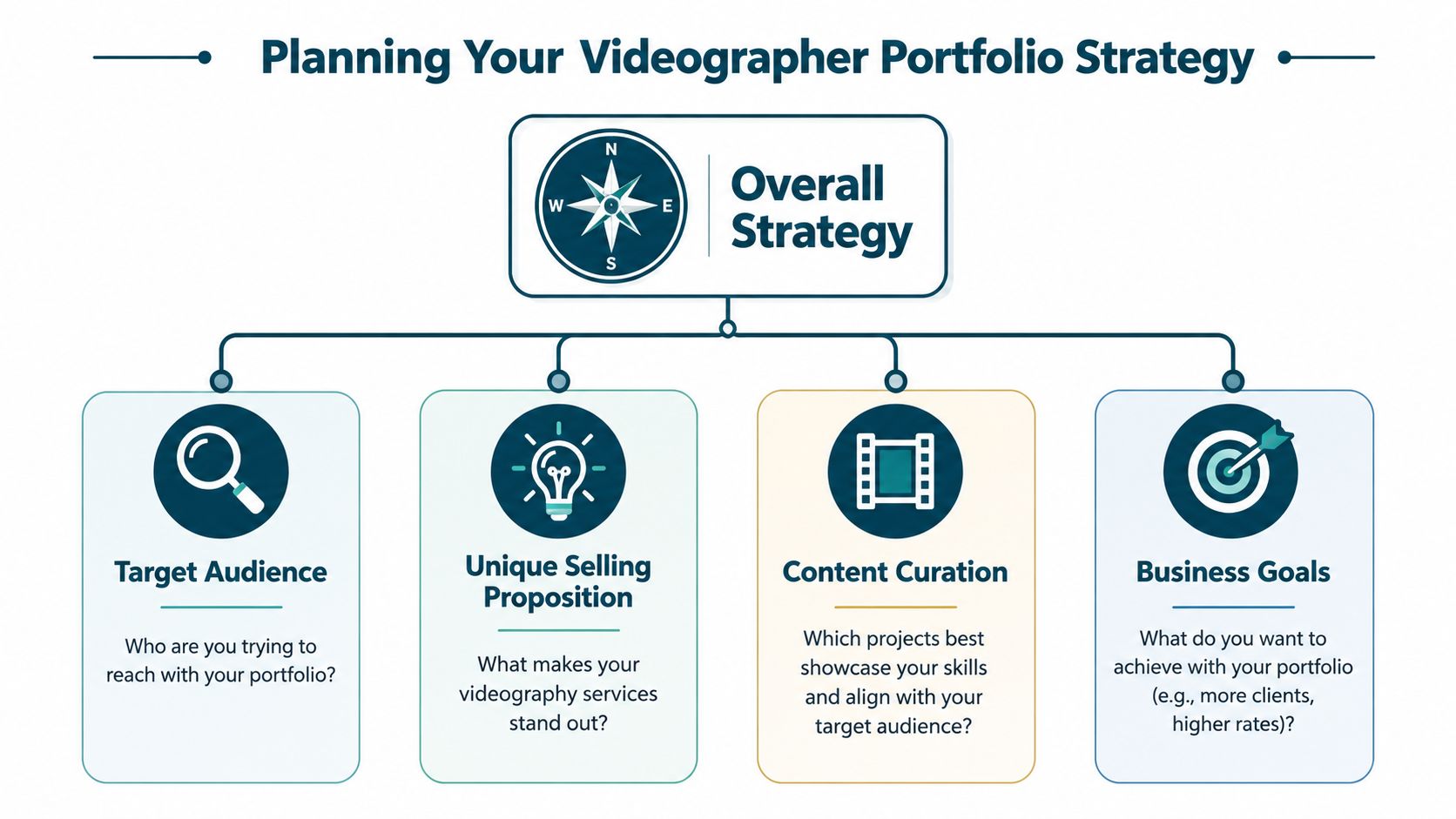
Pick the client before you pick the layout
The first decision isn't fonts, colors, or whether you want autoplay. It's who the site is for.
A wedding couple, a startup founder, an agency producer, and an events manager all judge portfolios differently. Couples buy emotion and trust. Agency producers look for execution and reliability. Brands want clarity, consistency, and signs that you understand commercial work. If your homepage mixes nightclub promos, bridal prep footage, interview lighting, and drone travel shots with no framing, the visitor has to do the sorting. Most won't.
Write down one primary client type and one secondary type. That's enough. Your site can still show range, but the message needs a center of gravity.
A simple planning filter helps:
- Primary buyer: Who pays you most often, or who you want to attract next.
- Best-fit work: Which projects make that buyer think, “They can do this for us.”
- Offer framing: What you want them to ask for. Brand films, event coverage, wedding films, social clips, product videos.
- Proof style: What kind of examples matter most. Full edits, short highlights, behind-the-scenes process, or category pages.
If you serve live events or branded productions, it also helps to understand what support clients may need around the shoot itself. For production logistics, gear support, and event filming context, London AV Hire for video production is a practical reference.
Build your homepage around a reel that sells
Your homepage has one job. Earn the next click or the inquiry.
The fastest way to do that is a sizzle reel at the top of the homepage. The benchmark is clear: a 30 to 120 second sizzle reel performs best for immediate impact, and 7 to 10 additional categorized projects is enough to show range without overloading people, based on Format's guidance on making a video portfolio.
That range matters because different buyers watch differently. Some will stay for a full minute if the pacing is good. Others will decide in fifteen seconds whether you're relevant. Your reel needs to work for both.
What belongs in the reel?
- Open with recognizably strong footage: Don't warm up. Put your best three shots first.
- Cut for the client you want: A wedding reel should feel different from a commercial reel.
- Show variety inside consistency: Different scenes are fine. Random style shifts are not.
- End with confidence: Your final beat should feel intentional, not like the timeline ran out.
A reel is not a scrapbook. It's a sales trailer for your services.
Curate proof, not volume
After the reel, the rest of the site should answer the objection a client hasn't said out loud yet: “Can they do this on a real job, not just in a montage?”
That's where category pages or selected projects come in. A corporate client may want to see a polished interview-led piece. A band wants to see energy, rhythm, and coverage choices. A wedding client wants to know whether you can handle story, sound, and emotion under pressure.
Use a short note with each project. Not a film school essay. Just enough context to make the work legible.
For example:
| Project type | What the client wants to know |
|---|---|
| Brand video | Can you make a company look credible and sharp? |
| Event film | Can you capture pace, crowd energy, and key moments cleanly? |
| Wedding highlight | Can you tell a story without making it cheesy? |
| Product spot | Can you light details and edit with precision? |
The best portfolios don't feel busy. They feel edited. That's the standard clients are hiring you for anyway.
Designing Core Pages for Maximum Impact
A videographer portfolio website doesn't need a dozen pages. It needs a few pages that each do one job well.
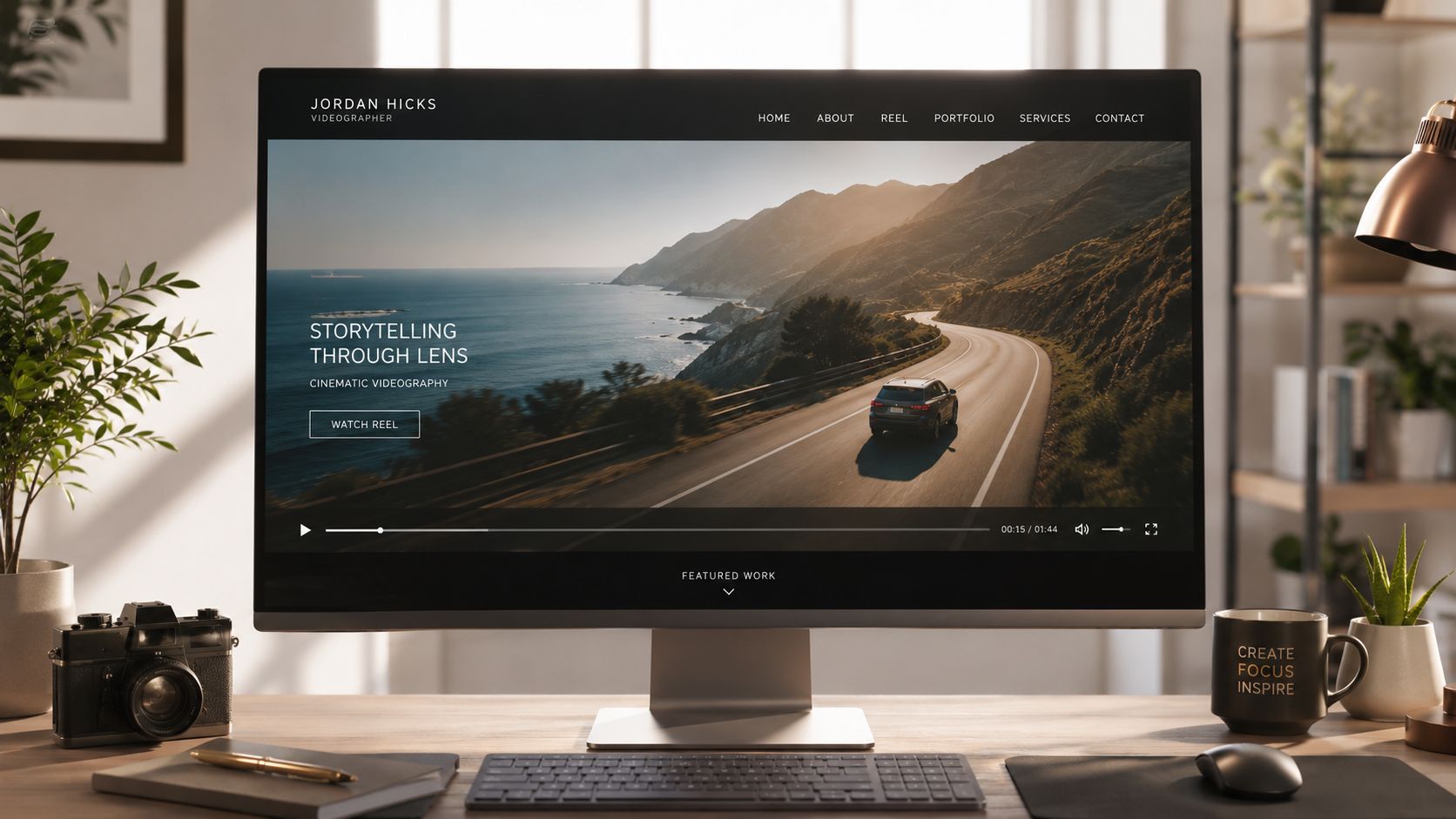
Homepage
The homepage is your pitch meeting without the small talk. Above the fold, the visitor should see your reel, a short line explaining what you do, and a clear path to contact you.
Don't make people hunt for basic information. “Cinematic films for brands and events” says more than “Visual storyteller.” The second phrase sounds nice and says almost nothing. Clients buy outcomes and fit, not mood-board language.
Keep the top section lean:
- Headline: State your niche or type of work.
- Reel: Front and center.
- Short support copy: One or two lines on who you work with or what you produce.
- Primary CTA: Contact, inquire, book a call, or request availability.
Work page
The work page is where interest becomes confidence. There, you organize the proof.
Group projects by how clients think, not by how your editing software exported them. “Weddings,” “Commercial,” “Events,” and “Music Videos” are useful labels. “Featured” and “Recent Work” can help too, but category clarity usually converts better because the visitor can self-sort immediately.
For each featured project, include:
- A strong thumbnail or poster frame
- A short project label
- A concise description of your role
- Any useful context about deliverables or style
If you shot, directed, edited, and handled sound cleanup, say that. It tells clients how much responsibility you can carry.
About page
This page isn't about your life story. It's about reducing risk.
Clients want to know who they're hiring and what working with you feels like. A good About page makes you sound experienced, organized, and human. It should explain your approach, your type of client, and the kind of projects you enjoy taking on.
Skip the inflated bio. Keep the tone grounded. You can mention how you work on shoot days, what you value in collaboration, or why you specialize in a certain format.
Clients don't need a dramatic origin story. They need a reason to trust your judgment.
A practical About page usually includes a portrait, a short bio, a niche statement, and a small note about your process or communication style.
Contact page
A common failure point for many otherwise good sites is this. They ask for too much, or they hide the form behind extra steps.
Your contact page should feel frictionless. Name, email, project type, timing, and a short message are enough for most freelancers. If you want budget information, ask for it politely, but don't make the form feel like an intake exam.
A strong contact page also includes:
| Element | Why it matters |
|---|---|
| Clear CTA | Tells visitors exactly what to do next |
| Simple form | Reduces drop-off |
| Email fallback | Helps people who prefer direct outreach |
| Response expectation | Reassures the client you're active and professional |
There's one more trade-off here. Some videographers put rates on the site to pre-qualify leads. Others keep pricing off and handle it in conversation. Both can work. If your projects vary heavily by scope, it's usually better to frame your services and invite an inquiry rather than force a flat package onto unlike jobs.
Optimizing and Embedding Video The Technical Details
A prospect clicks your site from their phone between meetings. They tap your featured video, wait, and nothing happens for a second too long. That pause is often enough to lose the inquiry.
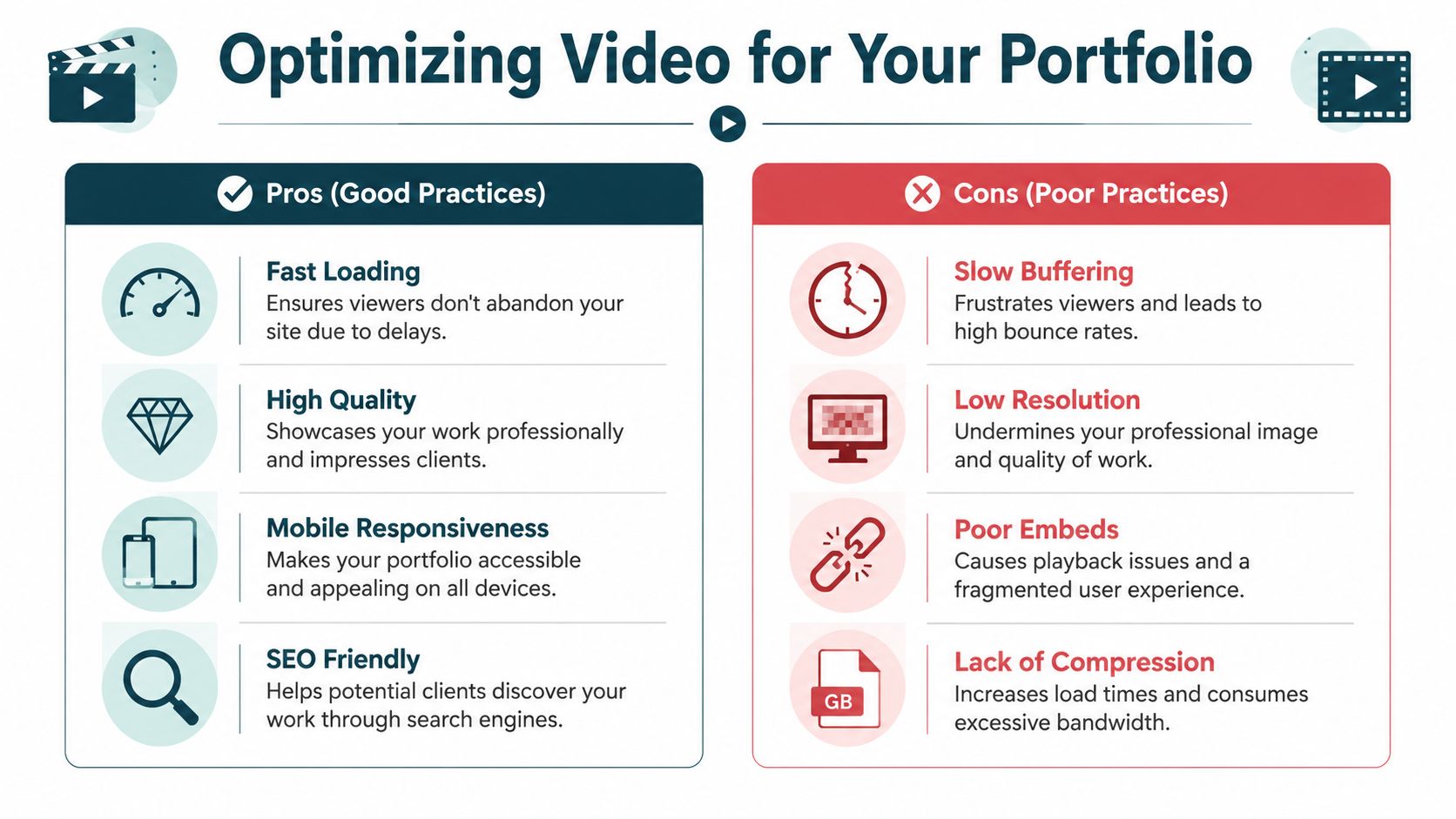
Technical setup affects sales more than many freelancers expect. Clients rarely say, "your embed settings cost you the project." They just form a fast opinion about how organized, current, and easy to work with you seem. A portfolio has to play smoothly, load fast enough, and guide the visitor to the next step.
Choose hosting based on client experience
YouTube, Vimeo, and self-hosting all work. The right choice depends on what the page needs to do.
YouTube is familiar and reliable. It also introduces distractions. Suggested videos, channel chrome, and the general platform feel can pull a visitor out of buying mode and into browsing mode. That can be fine for top-of-funnel discovery. It is less helpful on a service page where the goal is to get a call booked.
Vimeo usually presents work in a cleaner way. For commercial portfolios, that cleaner player often keeps attention on the work itself. The trade-off is cost and workflow. If you are early in business, paying for presentation control may or may not be the best use of budget.
Self-hosting gives you full control, but it also gives you full responsibility for compression, delivery, buffering, and playback across devices. I only recommend it if you already know how you will handle file sizes, CDN delivery, and mobile testing. For most freelance videographers, an embedded host is the safer business decision.
Use a simple filter:
- Choose YouTube for reach, search visibility, and easy publishing.
- Choose Vimeo for a more controlled on-site presentation.
- Choose self-hosting only if you can maintain performance without hurting load time.
If you need the setup steps, this guide on how to embed a YouTube video covers the basics.
Mobile playback shapes first impressions
A lot of portfolio reviews happen on a phone, not on a calibrated desktop monitor. Insivia's video marketing statistics roundup notes that video is projected to account for 82% of global internet traffic and that more than 75% of video consumption occurs on mobile devices.
That changes how to test your site. Open it on an actual phone. Use regular mobile data. Hold it one-handed. Scroll like a distracted client who is comparing three videographers in ten minutes.
Common problems show up fast:
- Hero videos that push the CTA too low. The visitor sees motion, but not the path to contact.
- Weak poster frames. Before anyone presses play, the thumbnail has to sell the click.
- Bad aspect ratio handling. Cropped faces and awkward black bars make polished work look sloppy.
- Heavy embeds. If the page stalls, the visitor blames your professionalism, not the internet.
Review the site the way a client does, not the way an editor does.
Compression and playback discipline
Uploading the biggest file you exported does not signal quality. It usually signals inexperience with web delivery.
The job is to keep the image strong while reducing friction. That means a clean thumbnail, fast-enough loading, and a reel that gets to the point. If your homepage reel takes too long to start or spends its first twenty seconds on moody filler, the technical issue and the editorial issue start working together against conversion.
A few habits help immediately:
- Export for web, not for archive. Your master file belongs on a drive. Your portfolio needs a lighter delivery file.
- Set a deliberate poster image. A random freeze-frame can make a strong campaign look cheap.
- Trim homepage reels hard. A shorter, sharper reel usually gets more full watches from decision-makers.
- Test every embed after publishing. Broken playback kills trust faster than almost any design flaw.
- Name files clearly. It keeps your media organized and supports search visibility.
There is also a workflow angle here. If you regularly post finished work to social channels after it goes live on your site, use tools that keep distribution organized. Teams managing client promotion can discover leading social media schedulers to keep clips, case studies, and launch posts consistent without turning every release into a manual chore.
Treat delivery as part of the portfolio, not a technical afterthought. A good video that plays badly can still lose the job.
Launching and Growing Your Online Presence
A videographer portfolio website usually gets judged in under a minute. A producer clicks in, watches a few seconds of your reel, scans two or three projects, then looks for one clear next step. If anything feels sloppy or confusing, they leave and message someone else. Launch is where that decision gets won or lost.
Run a real pre-launch check
Do one full pass before the site goes public, and do it like a client, not like the person who built it.
Open the site on your phone. Click every button. Submit the contact form. Watch the homepage reel, then open a project page and check whether the path to inquire is still obvious. A lot of portfolios fail here. The work is good, but the inquiry path disappears once the visitor starts browsing.
Check these items before you publish:
- Links: Every CTA, menu item, and social icon should lead to the correct destination.
- Forms: Send a test inquiry and confirm it lands in the right inbox.
- Mobile pages: Review every page on an actual phone, including load order and button placement.
- Copy: Remove filler, fix typos, and replace vague labels with service-specific wording.
- Project order: Lead with the work you want to sell more of, not the job that was most fun to shoot.
- Calls to action: Make sure every key page gives the visitor a clear way to contact you or request availability.
Speed and clarity matter here because they affect conversion directly. If the site feels slow, if the reel takes too long to start, or if the contact button is hard to find, the visitor rarely gives you the benefit of the doubt. A clean setup on a simple videographer portfolio platform at own.page can help keep that path clear without adding extra build work.
Do the boring SEO work
Good SEO for a videographer portfolio is mostly labeling your work properly so the right client can find it and understand it fast.
Use page titles that match buyer intent. "Commercial Videographer in Austin" says more than "Projects." Name projects by client type, deliverable, or industry when that helps the reader. File names, alt text, and short project summaries all help reinforce what you do. This work is not glamorous, but it supports the business side of the portfolio. It helps search visibility, and it also helps a busy client confirm they are in the right place.
A few practical fixes go a long way:
- Page titles: State the service and market clearly.
- Project names: Use real labels a client would recognize.
- Image alt text: Describe the frame or still accurately.
- Project descriptions: Add brief context about the brief, your role, and the outcome.
- Meta titles and descriptions: Write them for search results, not for yourself.
Promote the site where clients already see you
Once the site is live, distribute it like a sales asset. Add it to your Instagram bio, LinkedIn profile, email signature, proposal footer, and canned inquiry replies. If a prospect hears your name, they should find the same portfolio hub everywhere.
Promotion also works better when the site and your content output support each other. A new project on the portfolio can become a short clip, a stills carousel, a behind-the-scenes post, and a case-study link back to the site. If that part keeps slipping behind client work, use tools that discover leading social media schedulers so your posting rhythm does not depend on memory.
Keep updating the portfolio with intent. Remove work that attracts the wrong budget or the wrong type of inquiry. Feature the projects that match the clients you want next. A portfolio should not be a scrapbook. It should help book the next paid job.
Build Your Portfolio in Minutes with own.page
A lot of videographers delay launching because they think building a site has to become a separate part-time job. It doesn't.
If your goal is to get a clean, client-ready portfolio online quickly, own.page gives you a fast way to do it without wrestling with a traditional website stack. That matters when the primary bottleneck isn't creativity. It's getting your best work into a format clients can browse easily.
The practical advantage is speed. You can build from phone or browser, arrange sections with drag-and-drop blocks, and embed video from platforms you already use. That keeps the focus where it belongs. On your reel, selected projects, contact path, and overall presentation.
For a videographer, the useful parts are straightforward:
- Video embeds: Add YouTube or Vimeo content without clunky workarounds.
- Mobile-first layouts: Your site stays usable on the devices clients browse on.
- Flexible sections: Build a homepage, portfolio, or simple multi-page presence around your work.
- Built-in analytics: See what people click and refine the page over time.
That setup fits the business side of a portfolio well. You don't need endless customization to start converting visitors. You need a site that loads cleanly, looks professional, and makes it easy for someone to move from watching your work to contacting you.
If you're a freelancer, that speed has a second benefit. It lowers the odds that your portfolio stays stuck in “almost finished” mode for months. A simple system you'll update beats a complex one you keep postponing.
The best videographer portfolio website isn't the one with the fanciest animation or the longest list of features. It's the one that gives your best work a clear sales path. Strong reel. Focused projects. Clear positioning. Frictionless contact.
That's what books paid work.
If you want the fastest route from scattered links to a polished portfolio, try own.page. It's a simple way to launch a mobile-friendly videographer site, embed your best videos, organize your work, and start sending clients one professional link instead of five.
Free tools · no sign-up