What Is No Code: A Guide for Creators & Business
 Elitza Vasileva

You've probably had this moment already. You want one clean place online that explains who you are, shows your work, links to your latest post, and gives people an easy way to contact you. Maybe it's a portfolio. Maybe it's a link-in-bio page that doesn't look like everyone else's. Maybe it's a simple site for your freelance business.
Then the usual friction shows up. You either need to learn code, hire a developer, wrestle with a complicated tool, or settle for a page that feels generic.
That's where no-code starts to matter. If you've been asking what is no code, the short answer is simple. It's a way to build websites, apps, and workflows without writing code, using visual tools, pre-built components, and drag-and-drop interfaces, as IBM describes in its overview of no-code development. The deeper answer is more interesting. No-code changes who gets to build.
For creators, freelancers, and small businesses, that shift is practical. You don't need to wait for a developer to launch a portfolio, test a landing page, or create a branded hub that pulls together your links, videos, music, and social profiles. You can make the thing yourself, then keep improving it as your work evolves.
Table of Contents
- The Dream of Building Without Code
- How No-Code Actually Works
- No-Code vs Low-Code vs Traditional Development
- The Power and Pitfalls of No-Code
- What You Can Build With No-Code Today
- Your First Steps into the No-Code World
The Dream of Building Without Code
Maya is a freelance photographer with a familiar problem. She does not need a giant website. She needs a clean home online where a new client can see her style, scan her prices, tap through a few photos, and contact her before the moment passes.
For a long time, that kind of project sounded small but behaved like a big one. A simple site could still mean wrestling with templates, hunting for plugins, or waiting for someone else to make each update. The idea was clear. Publishing it was the hard part.
That friction is the problem no-code solves.
For creators and freelancers, no-code is less about the tool itself and more about what it lets you make without turning every change into a technical job. A writer can publish a link-in-bio page that points readers to new essays, a newsletter signup, and a booking link. A designer can turn scattered work samples into a polished portfolio. A coach can put an offer, testimonial, and contact form in one place and send people there with confidence.
A creator-friendly definition
No-code means building by choosing, arranging, and configuring ready-made parts instead of writing software from scratch.
It works a lot like building with LEGO. You are not molding the plastic. You are picking the right pieces and snapping them together into something useful.
Those pieces might include:
- A text block for your intro
- An image section for portfolio samples
- A form for inquiries
- A video embed for your reel
- A link block for booking, social profiles, or products
That shift matters because it changes who gets to build. You do not need to translate every idea through a developer, especially when the project is really about presentation, trust, and connection. If you are exploring a no-code website builder for creators and freelancers, that is its core appeal. You can shape your online presence yourself.
The appeal of control
The biggest benefit is control over timing and message.
Your website is often the first place someone decides whether to hire you, follow you, or ignore you. If you launch a new service, update your rates, publish a fresh case study, or want to feature a new video, you should be able to make that change the same day. No-code turns those updates into normal business tasks instead of delayed mini-projects.
That is why the question is not only what no-code is. It is what no-code makes practical for one-person brands. It gives creators a faster way to build a credible online home, keep it current, and stay closer to their audience.
How No-Code Actually Works
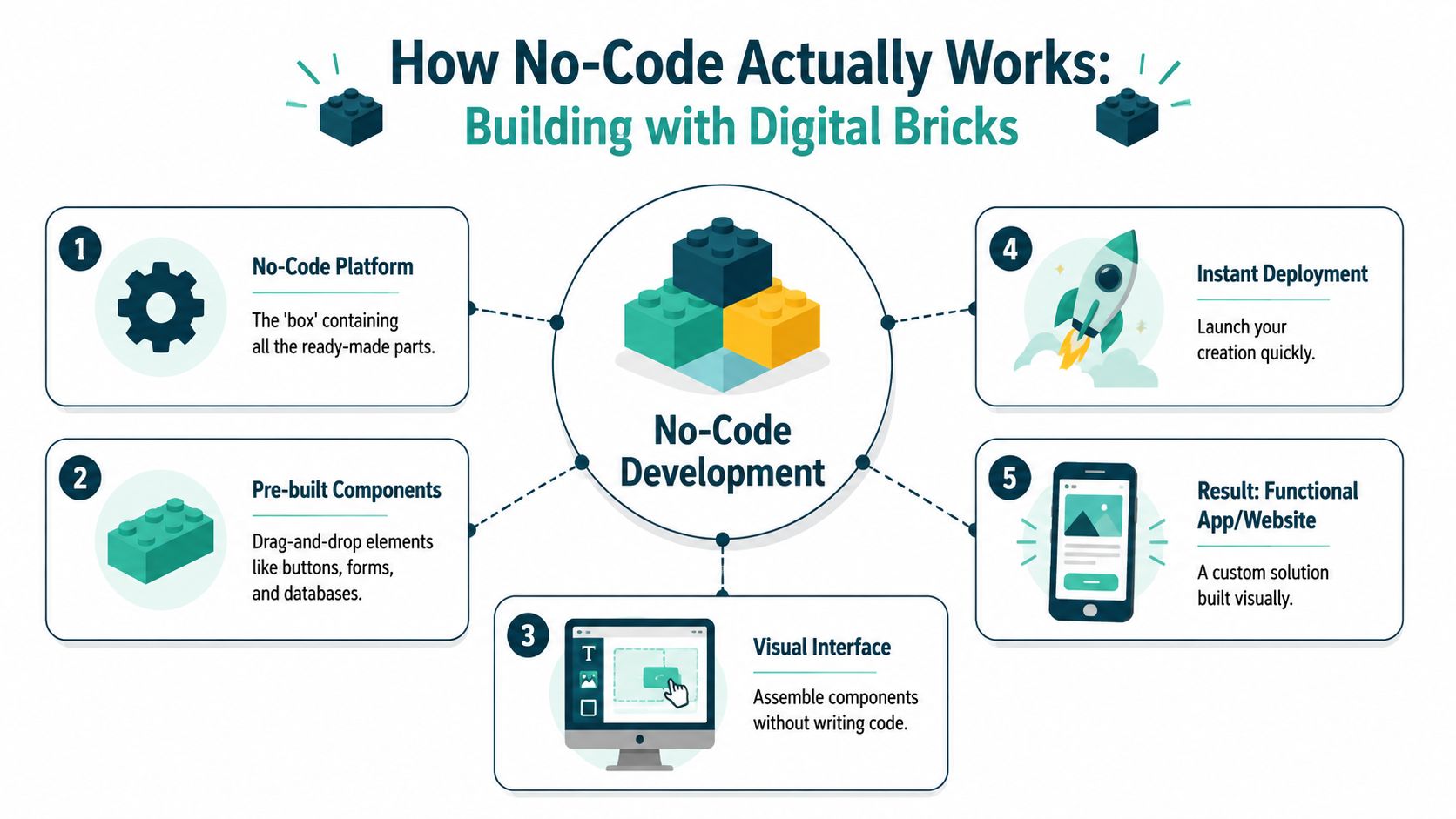
No-code platforms operate through reusable building blocks. You choose ready-made parts, set their options, and the platform turns those choices into a working site or app.
For a creator or freelancer, that can look very concrete. You add a hero section for your intro, drop in a gallery for portfolio samples, connect a form for inquiries, and publish a page that helps new visitors understand who you are and how to work with you. A link-in-bio page, a simple service site, or a personal portfolio often comes together this way.
Building with parts that already know their job
Each block comes with behavior built in. A button is not just a shape on a screen. It already knows how to open a link, submit a form, or send someone to a booking page. A form already knows how to collect details and pass them along. A content collection already knows how to organize repeated items like projects, testimonials, or blog posts.
That is the key idea. You are arranging working parts, not sketching placeholders.
Here are some of the pieces no-code platforms usually give you:
- Text blocks that display headlines, bios, and descriptions
- Buttons that trigger actions like booking, subscribing, or visiting a store
- Forms that collect inquiries, emails, or project requests
- Databases or content collections that store things like case studies or portfolio entries
- Embeds and integrations that connect your page to outside tools
What the platform handles behind the scenes
The visual editor is the part you see. Underneath, the platform is generating the code and logic needed to make your choices work online.
IBM notes in its overview of how no-code platforms work that these systems use structured rules to keep things stable while handling tasks such as validation, integrations, and connectivity inside the platform. In plain language, the tool gives you useful boundaries and takes care of a lot of the technical setup.
A simple contact form shows the process well:
You place the form on the page
You choose where it appears and what it should help the visitor do.You set the options
You pick the fields, confirmation message, and destination for responses.The platform creates the behavior
It handles what happens when someone clicks submit.The system manages the technical layer
It often takes care of hosting, validation, storage, and basic connections.You publish
The form works on your live site without hand-written code.
Practical rule: You still decide how the experience should work. The platform handles much of the plumbing.
This is why no-code feels fast once it clicks. You focus on the outcome, such as a portfolio that is easy to update or a link hub that guides followers to your latest work, instead of spending your time on setup details. If you want to see that in a creator-friendly website example, this guide to a no-code website builder for creators and freelancers shows how visual blocks turn into a finished online home.
No-Code vs Low-Code vs Traditional Development
A lot of beginners lump these together. They shouldn't. The difference matters because each option fits a different kind of builder.
Three ways to build
No-code is for people who want to build without programming. It's aimed at creators, business users, freelancers, and teams that need speed and simplicity.
Low-code still uses visual tools, but it leaves room for custom code. That makes it useful for developers, technical teams, or advanced users who want faster development without giving up flexibility.
Traditional development means writing code directly. It offers the most freedom, but it also demands the most technical skill and time.
Here's the simplest comparison:
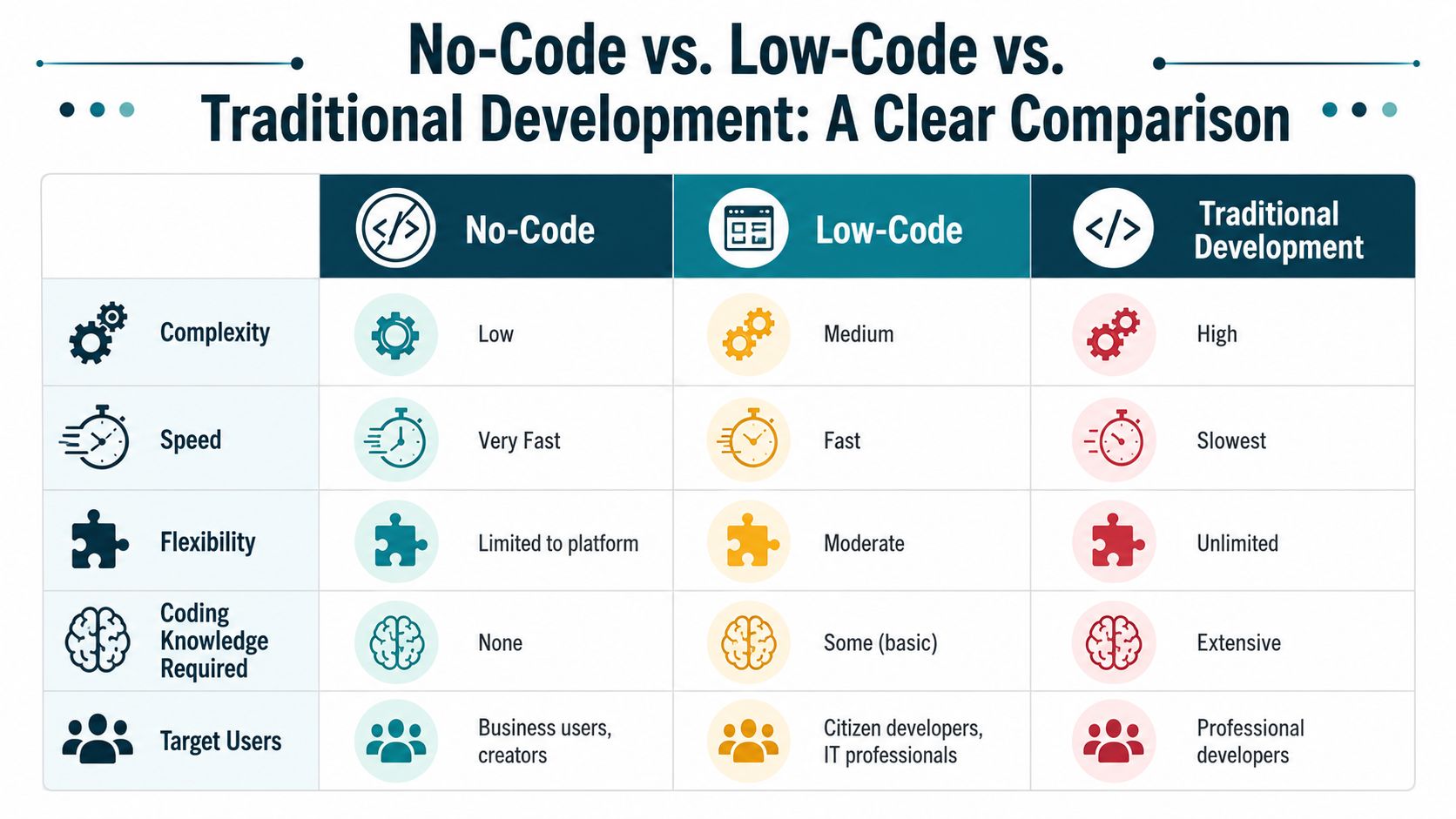
| Criteria | No-Code | Low-Code | Traditional Development |
|---|---|---|---|
| Complexity | Low | Medium | High |
| Speed to launch | Very fast | Fast | Slowest |
| Flexibility | Limited to platform | Moderate | Unlimited |
| Coding knowledge required | None | Some | Extensive |
| Target users | Business users, creators | Citizen developers, IT professionals | Professional developers |
The easiest way to choose is to ask one question: Do you need freedom to invent custom behavior, or do you need speed to ship a clear idea?
If you're building a personal site, portfolio, campaign page, or lightweight business tool, no-code is often enough. If you need a highly custom product with unusual workflows, low-code or traditional development may fit better. This comparison of a no-code website builder vs traditional website development is useful if you're deciding between those paths for a site project.
Where AI is changing the picture
The categories are also starting to blur.
Google Cloud now describes generative no-code prototyping, where users can prompt a system in plain language to build applications, as noted in its guide to what no-code means today. That's a shift from visual-only building toward prompt-based creation.
Some tools now let you start with words, then refine with visual controls. That doesn't replace judgment. It changes the starting point.
This is one reason no-code feels newer than the old drag-and-drop stereotype. It's no longer only about moving boxes around a screen. It's becoming a mix of configuration, templates, automation, and AI-assisted generation.
The Power and Pitfalls of No-Code
A freelancer has a new offer ready by Friday. They need a page with a clear headline, a few work samples, a contact form, and a booking link. With no-code, that can go live fast, often without hiring a developer or waiting through a long build process.
That speed is the appeal.
For creators and freelancers, no-code gives you a way to turn an idea into something people can visit, click, and respond to. A personal brand site, a link hub, a lead capture page, or a simple client-facing website can start working for you while the idea is still fresh. If you want a practical example, a no-code landing page builder for creators and freelancers shows how this works in a real business context.
The deeper benefit is ownership. You can update your headline after testing a new positioning idea. You can swap portfolio pieces when your niche changes. You can add a testimonial, a booking link, or a free download without sending a request to someone else and waiting days for a small edit.
It works a lot like building with LEGO pieces. The blocks are already made. Your job is to choose the right ones and arrange them well.
That structure makes no-code approachable. It also creates the limits.
Microsoft explains one of the biggest trade-offs clearly in its overview of low-code and no-code platforms. You get less customization than you would with traditional development. For many creator projects, that trade is worth it. For unusual products, it can become a constraint.
Here are the friction points that tend to show up first:
- Customization limits when you want behavior the platform was not designed to support
- Integration problems if your workflow depends on a niche app or a very specific data setup
- Platform lock-in because your pages, forms, and automations live inside one vendor's system
- Performance constraints if the project grows into something much heavier than a content site or simple tool
A useful rule is this: no-code is strongest when the goal is clear and the workflow is fairly standard.
That covers a lot of real creator work. A portfolio. A link-in-bio page. A simple service site. A waitlist page for a new offer. An intake form connected to email and booking tools. It can even support back-office tasks through automation, like the kind described in this guide for UK freelancers and small businesses.
Problems usually start when people expect no-code to behave like custom software built from scratch. If your project needs unusual permissions, deep backend logic, or a product experience no template can model well, you may hit the walls of the system faster than expected.
So the main question is not whether no-code is good or bad. It is whether the tool matches the job. For many freelancers and creators, it does, especially when the goal is to build a stronger online presence, stay easy to contact, and keep improving your brand without technical bottlenecks.
What You Can Build With No-Code Today
A freelance illustrator gets a new inquiry from Instagram. A musician wants one place to share songs, videos, and tour dates. A coach needs a page that explains an offer and lets people book. These are the kinds of projects no-code is great at because the goal is clear: give people one simple path to learn about you and take action.
For creators and solo business owners, no-code is less about software jargon and more about building your online home. You can assemble pages from ready-made blocks, the way you build with LEGOs. Add a bio. Drop in your best work. Connect a form. Publish. Then adjust it as your brand, services, or audience change.
Real projects that fit creator work
A good first example is a mobile-first page that acts as a digital home base. It can hold a short bio, a profile image, featured links, social buttons, a YouTube video, a Spotify embed, and a contact option.
From there, the same approach can grow into a small business site that feels much more intentional:
- A portfolio page with selected projects and testimonials
- A service page that explains offers in plain language
- A lead capture page for inquiry forms or email signups
- A booking page linked from social profiles and email signatures
Local businesses can use the same building blocks in a simpler way. A clean page with hours, services, location details, reviews, and a call button often does more useful work than a large site that is hard to update.
As noted earlier, industry analysts expect a growing share of new applications to be built with low-code and no-code tools. The reason is easy to understand. People want a shorter path from idea to something live, useful, and easy to improve.
A simple stack for a one-person business
A one-person business usually does not need a giant website on day one. It needs a page that helps visitors do one clear thing.
That might look like this:
- A designer sharing a portfolio, intake form, and Instagram
- A musician embedding tracks, videos, and upcoming dates
- A coach presenting an offer, a booking link, and a free resource
- A student showing projects, a resume, and contact details
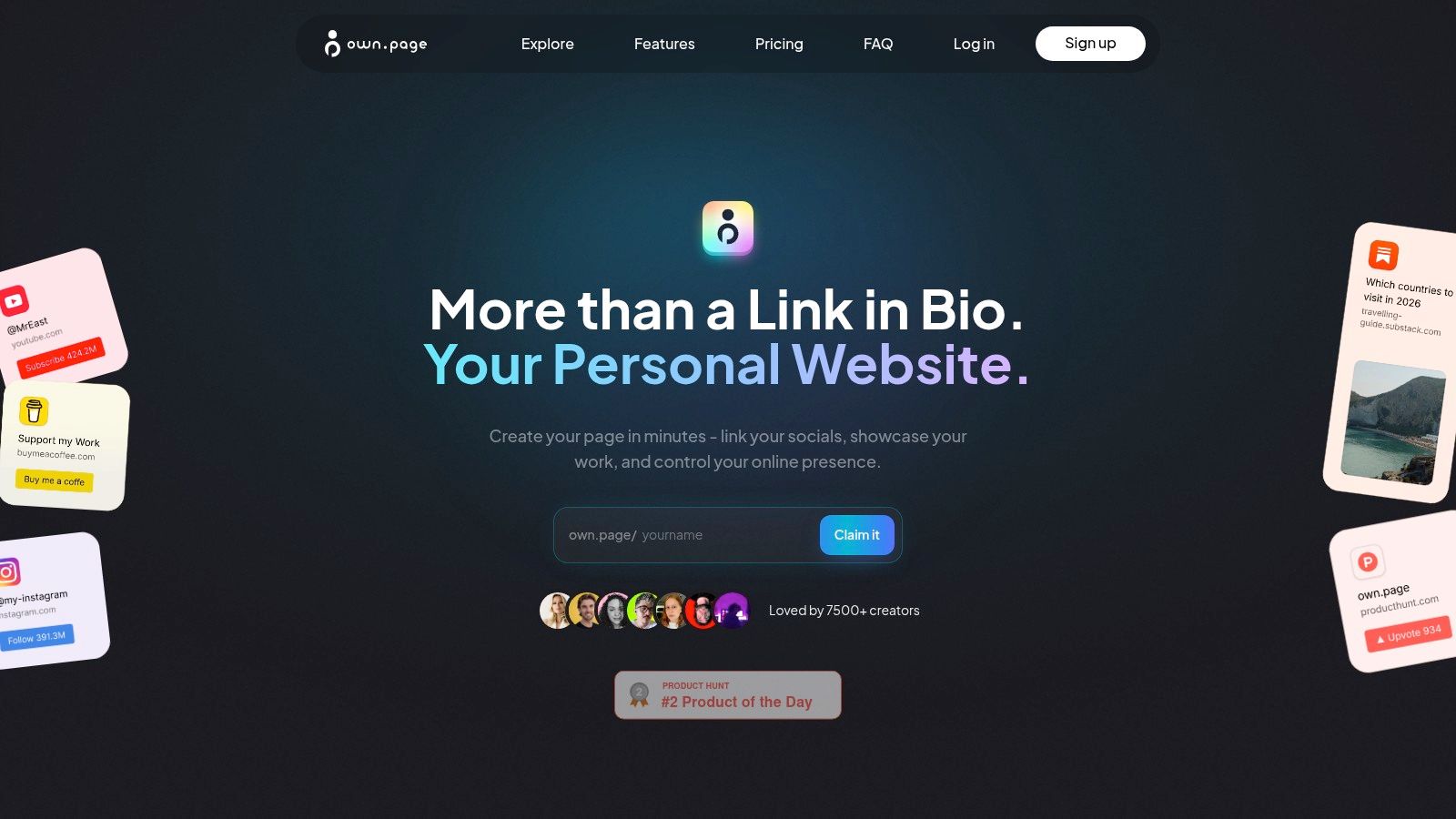
One practical option for this kind of project is own.page, which lets people build a personal page or small website with drag-and-drop blocks for links, text, images, video, and embeds from platforms like YouTube and Spotify. If your goal is a campaign or offer page rather than a full portfolio, a no-code landing page builder is often the simpler starting point.
Your public page is only part of the picture. Once inquiries start coming in, you may also want simple back-office systems for forms, payments, and follow-up. This guide for UK freelancers and small businesses is a useful companion read for handling accounting workflows once leads and payments start coming in.
A short demo helps make the idea concrete:
The big idea is straightforward. No-code helps creators turn scattered links, half-finished ideas, and offline services into a clear online presence people can understand in seconds.
Your First Steps into the No-Code World
You have an idea on Tuesday. By Friday, you want one clean page that shows who you are, what you offer, and where people can contact you. That is the right kind of first no-code project.
Beginners usually get blocked for one reason. The first project is too big. A creator starts out wanting a link-in-bio page, then adds a newsletter, a shop, a booking system, a client portal, and a blog. Suddenly a simple page feels heavy.
Start smaller. Build the online home that solves one real problem this week.
Start with one small outcome
Choose a result you can publish fast and improve later, like stacking a few useful LEGO pieces before building the full set.
Good first projects include:
- A link-in-bio page that gathers your key links in one place
- A portfolio page that shows your best work and how to reach you
- A landing page for one service, workshop, or digital product
- A simple form to collect inquiries or email signups
This works well for creators and freelancers because the payoff is immediate. A photographer can stop sending five separate links. A coach can share one page with an offer, testimonial, and booking button. A musician can send one clean destination instead of a messy mix of social profiles.
When the goal is clear, the build gets easier. You know what belongs on the page, what can wait, and what “finished for now” looks like.
Pick the tool that matches the job
No-code is more like a toolbox than a single app. A website builder, an automation tool, and an app builder may all be “no-code,” but they solve different problems.
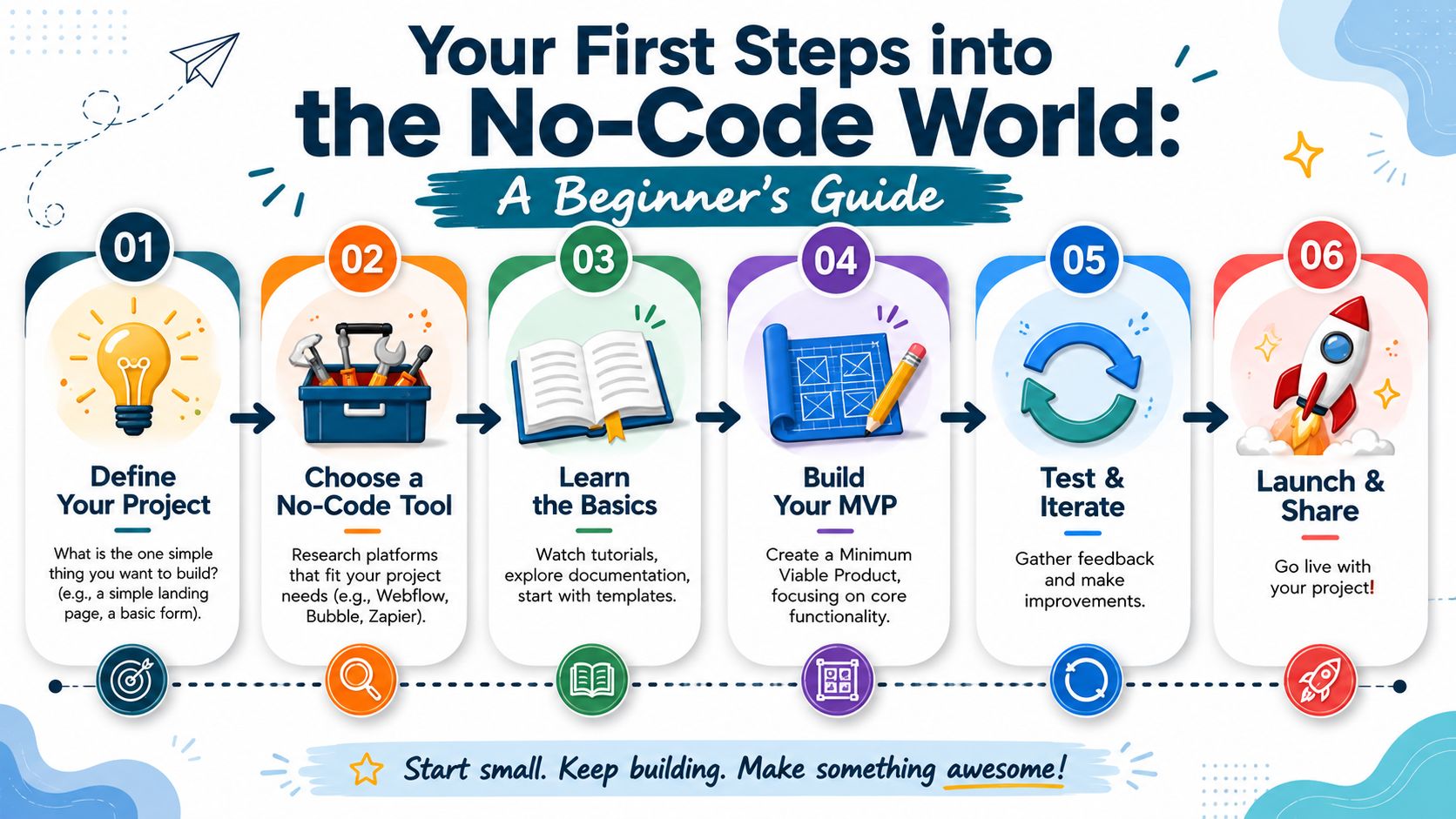
A simple way to sort your options:
For personal sites and creator pages
Use a no-code website builder with visual blocks and mobile-friendly layouts.For more complex web apps
Use a platform built for app logic and workflows, such as Bubble.For automations
Use tools like Zapier to connect apps and reduce repetitive tasks.For visual site design with more structure
Use a builder such as Webflow if you want more design control and can handle a steeper learning curve.
As noted earlier, no-code has grown from a niche idea into a large market. That is why the category now includes tools for very different jobs, from simple creator pages to advanced workflow systems.
Launch early and improve in public
Your first version doesn't need every section, every integration, or every clever detail. It needs to work.
A strong first launch usually includes:
- A clear purpose so visitors understand what you do within seconds
- One main action such as booking, contacting, or viewing your work
- Consistent branding with simple colors, fonts, and images
- Room to grow as you learn what people click and ask about
Start with the page you can publish this week, not the platform you might build someday.
Then watch what happens. Which link gets the most taps? Do people scroll to your work samples? Are they asking questions your page should already answer?
That feedback is part of the build. No-code works best when you treat your site like a draft you keep improving, not a one-time assignment.
Learning resources help, too. Product documentation, YouTube tutorials, and user communities are often enough to get unstuck. You do not need to become a developer. You need a little confidence, a small project, and the willingness to test, publish, and refine.
If you want a simple way to turn your links, work samples, videos, and brand into one polished online home, own.page gives creators, freelancers, and small businesses a no-code way to build a personal site or link-in-bio page from a phone or browser.
Free tools · no sign-up