How to Make Digital Products: A Complete Guide 2026
 Elitza Vasileva

Most advice about digital products gets the order wrong. It tells you to pick a format, open Canva, record a mini-course, or build a landing page first. That's backwards.
Digital products are not magic passive-income objects. They're packaged solutions to specific problems. They can scale well because you can create them once and sell them repeatedly without inventory or shipping, and the rise of low-code creation has lowered the barrier for nontechnical creators. The low-code development platform market was valued at about $26.9 billion in 2023 and is projected to reach roughly $187 billion by 2030, according to Whop's digital product statistics roundup. That matters because more creators can now build and ship useful assets without a full engineering team.
A frequently skipped step is demand validation. If nobody wants the outcome your product delivers, your polished files won't matter. A more durable approach is to treat digital products like small systems: validate the pain point, choose the lightest format that solves it, package it clearly, and sell it from a simple home you control. If you want another practical breakdown of how to craft digital offerings, that piece is useful for seeing how creators turn expertise into products people can buy.
Table of Contents
- Beyond the Hype The Real Path to Digital Products
- Find a Problem Before You Build a Product
- Choose Your Product Format and Tools
- Package and Price Your Product for Sale
- Build Your Sales Hub with a Personal Site
- Market Your Product and Measure What Matters
Beyond the Hype The Real Path to Digital Products
The popular pitch is simple: make a PDF once, upload it, and wake up to sales. That's why so many new creators start with the product file instead of the customer problem. Then they spend days formatting, branding, and polishing something nobody asked for.
Opportunity is better than the hype, but less glamorous. A digital product is a compact business asset. It works when it saves time, reduces confusion, organizes a messy task, teaches a clear skill, or gives a buyer a faster path to a result. That's true whether you're selling a Notion template, a Canva pack, a swipe file, an ebook, or a short training.
What makes this category attractive isn't fantasy. It's the multiplier effect. You build once, improve over time, and deliver without physical overhead. Low-code and no-code tools make this easier for solo creators, freelancers, and small operators who want something more scalable than pure client work.
Practical rule: Don't ask, “What digital product should I make?” Ask, “What repeated problem do people already try to solve, and what is the smallest paid solution I can package?”
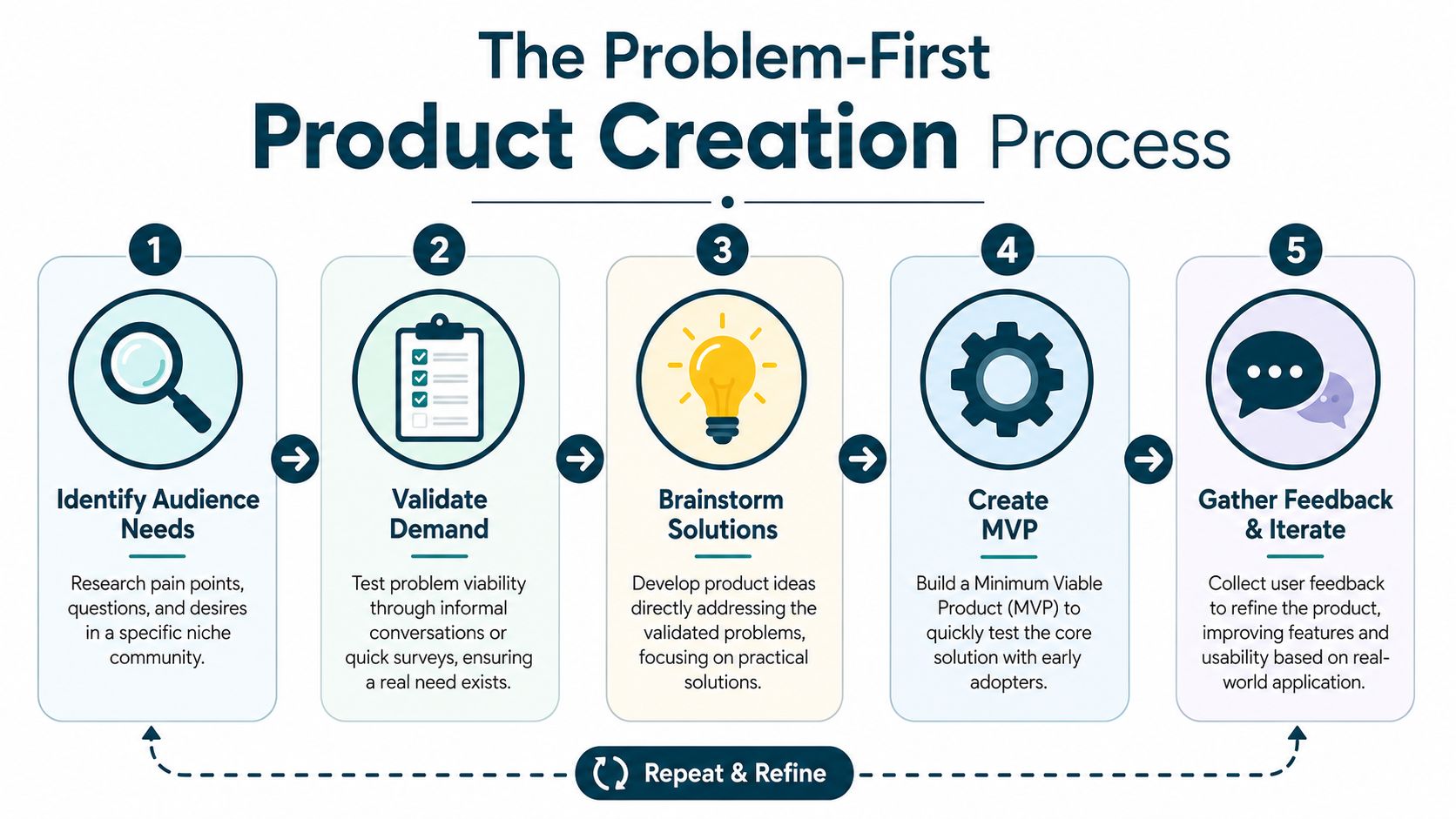
Structured product thinking works better than creator instinct. Guidance from Prophet's product creation model argues for defining the opportunity and target user before design, then validating demand before moving into experience design, alpha, beta, and launch in its six-step guide to digital product creation. That sequence matters because it separates problem validation from solution building.
This is the path that holds up in practice. Less guessing. Less wasted production. Fewer dead-end launches built on enthusiasm alone.
Find a Problem Before You Build a Product
A weak launch usually starts much earlier than design. It starts when a creator picks a format first, builds in private, and only then checks whether anyone wants the thing.
Independent creators miss demand in predictable ways. They build for their own workflow, copy a trending product category without checking buyer intent, or mistake free engagement for purchase intent. That pattern shows up often enough that demand validation should be treated as the first build step, not a nice extra. Guidance from MyDesigns on choosing the right digital product niche points in the same direction. Niche selection works better when it starts with observable demand, not personal preference.
Look for pain that already has language around it
Good product ideas leave a trail. Buyers complain in reviews. They ask for shortcuts in forums. They share homemade workarounds in communities because the existing options do not fit how they work.
Start where people describe the problem in plain terms. Reddit threads, Etsy reviews, Gumroad comments, YouTube comments, Amazon KDP reviews, and niche Facebook groups are useful because they contain the buyer's wording, not your interpretation of it.
The best signals are usually boring:
- Repeated complaints: People say current products are too generic, too advanced, badly structured, or missing real examples.
- Visible workarounds: Shared checklists, copied spreadsheets, prompt libraries, and DIY templates show that users already patch the problem themselves.
- Urgent questions: Posts asking how to do something faster, more cheaply, or with less confusion often point to paid demand.
- Review gaps: Negative reviews tell you where an existing offer falls short and what buyers still want.
One comment means nothing. The same complaint across search results, reviews, and communities is a pattern.
Validate with a simple workflow
I use a short filter before I build anything. It keeps scope tight and cuts a lot of wasted production time.
Define one buyer clearly
Broad categories blur the product. "Freelancers" is vague. "New freelance designers who need a client onboarding kit" gives you a buyer, a job to be done, and a clearer sales message.Write the problem in one sentence
Use plain language. If the problem statement sounds fuzzy, the offer will too. A usable version looks like this: "They lose leads because they do not have a consistent proposal and onboarding process."Check whether people are already looking for a solution
Use keyword research, marketplace search, and forum language together. Search volume can help, but intent matters more than raw numbers. Phrases with clear buying intent, product comparisons, and specific use cases are stronger signals than broad educational terms. If you plan to test demand with a simple page before building the full product, a no-code landing page builder for quick validation makes that process faster.Study what people already pay for
Search Etsy, Gumroad, and Amazon KDP for the exact problem, not just the niche. Look at titles, previews, promise clarity, pricing bands, and review complaints. Competition is useful here. It proves buyers spend money. Your job is to spot the missing angle, the better packaging, or the simpler path to the result.Ask for a small commitment before full production
A waitlist is fine. A pre-sell is better. A paid beta, concierge version, or stripped-down first release gives cleaner evidence than likes or polite comments. If you want a broader framework for stress-testing startup assumptions, that validation process maps well to digital products too.
The easiest digital product to sell solves a problem the buyer already recognizes.
That shift matters. Start with proof of demand, then build the smallest product that addresses it. You get better positioning, cleaner copy, and a sales process that depends less on constant social posting and more on matching an existing problem to a clear offer on your own site.
Choose Your Product Format and Tools
Once the problem is validated, the next mistake is overengineering the solution. People often jump to a course because it feels substantial, or to software because it sounds premium. In practice, the right format is usually the lightest one that reliably solves the buyer's problem.
Match the format to the job
If the customer needs understanding, an ebook or guide can work. If they need execution, a template is often better. If they need demonstration, a mini-course may fit. If they need raw materials, an asset pack makes more sense.
A good product format removes friction. It shouldn't ask the buyer to consume five steps when one would do.
Here's a simple way to think about common formats:
| Product Type | Creation Effort | Price Potential | Best For |
|---|---|---|---|
| eBook or guide | Low to medium | Low to medium | Teaching a process, frameworks, reference material |
| Template | Low to medium | Low to medium | Saving time, giving buyers a ready-to-use system |
| Mini-course | Medium to high | Medium to high | Showing implementation, walkthroughs, demonstrations |
| Asset pack | Low to medium | Low to medium | Buyers who need components, presets, graphics, prompts, or files |
Digital Product Format Comparison
The table helps, but the ultimate decision comes down to buyer behavior.
- Choose a guide if the customer says, “I need to understand this.”
- Choose a template if they say, “I need something ready to use.”
- Choose a mini-course if they say, “I need to see how you do it.”
- Choose an asset pack if they say, “I need the ingredients, not the lesson.”
A short template that gets used beats a long course that sits unfinished.
That's why I usually advise creators to start smaller than they want to. A template bundle or focused guide is easier to validate, faster to revise, and easier to support than a sprawling course library.
Pick the lightest tool stack
Use tools that let you produce fast and update easily. Canva works for guides, workbooks, lead magnets, and simple product mockups. Notion works for operational templates and dashboards. Google Docs is enough for drafting many products. Screen recording tools work for compact video lessons. File packaging can stay simple unless delivery becomes complex.
If your product edges into interactive or AI-driven territory, it helps to study adjacent workflows like deploying AI for businesses, because the same principle applies: start with the business use case, then choose the least complicated build path.
For the page that presents the offer, a no-code builder is often enough. A practical option is a no-code landing page builder that lets you ship a focused sales page without adding development work to a product that has already been validated.
The more mature your process becomes, the more useful it is to think in product stages instead of creative bursts. Define the opportunity, validate demand, then design and ship. That keeps effort tied to evidence.
Package and Price Your Product for Sale
Packaging decides whether a useful product gets ignored or bought. The file matters less than the buyer's sense of what they will get done with it.
Package the outcome, not the file
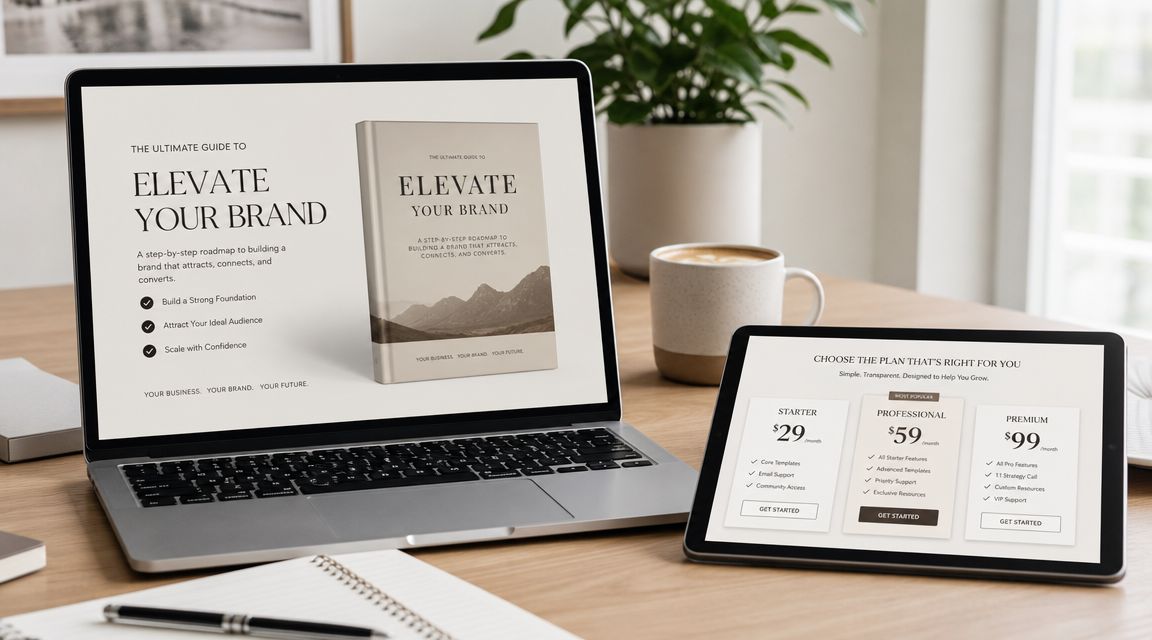
A strong offer makes the use case obvious. "Freelance Proposal Bundle" tells me what problem it solves. "Studio Resource Kit" makes me guess. Buyers rarely pay for ambiguity, especially with low-ticket digital products where they decide fast.
Write the offer page copy around four things:
- Who it is for: Name the buyer clearly.
- What job it helps them do: Show the task, not the file type.
- What is included: List the actual assets, formats, and any instructions.
- How delivery works: Explain access, compatibility, and what the buyer needs to edit or use it.
Good packaging also reduces support. If buyers know whether your template works in Canva, Notion, Google Sheets, or Keynote before they purchase, you get fewer refund requests and fewer "how do I open this?" emails.
Mockups help because digital products are hard to evaluate at a glance. Show the product in use. A planner on a tablet, a swipe file in a browser window, a Notion dashboard with sample entries. The goal is clarity, not decoration.
Set a starting price with evidence
Creators waste a lot of time trying to price from confidence alone. A better approach is simpler. Check what buyers already pay for similar outcomes, then place your offer based on scope.
Use a practical pricing pass:
- Review comparable products: Look at offers solving the same problem in a similar format.
- Match price to scope: A single template should not carry the same price as a guided system with examples, walkthroughs, and bonus assets.
- Price the result: Products tied to a recurring business task or a costly mistake can support a higher price than novelty downloads.
- Start with room to adjust: Early sales give better pricing feedback than opinions from peers.
I usually set an initial price after looking at three things. How painful the problem is, how complete the solution is, and how much time the product saves. If the first buyers purchase quickly, the price may be low. If people click through but hesitate, the offer may need better packaging before it needs a discount.
Keep the first version easy to revise. A simple checkout page and a clear product page on a no-code personal page for selling digital products is often enough to test whether the market accepts the offer.
Low prices do not rescue weak products. Clear positioning, a defined outcome, and evidence that people want the result do far more than shaving a few dollars off the tag.
Build Your Sales Hub with a Personal Site
Marketplaces are useful. So are checkout tools. But relying only on third-party platforms creates a scattered business. Listings get boxed into marketplace layouts, link-in-bio pages often feel improvised, and social profiles bury your actual offer.
A personal sales hub fixes that. It gives your product one clean home with your positioning, your visuals, your call to action, and your links.
What your sales hub needs
Keep it simple. A digital product page does not need ten sections and a giant brand manifesto. It needs enough information to answer buyer questions and move them to purchase.
At minimum, include:
- A clear headline: State the outcome, not just the product name.
- One short explanation: Tell buyers who it's for and why it helps.
- Product visuals: Add mockups, previews, or screenshots.
- What's included: List the files, modules, or assets.
- Delivery details: Explain how access works after purchase.
- One primary button: Send buyers to checkout or direct purchase.
That structure works because it removes ambiguity. When a buyer lands on the page, they should know within seconds whether the product is relevant.
A simple page structure that converts cleanly
A good low-lift setup is a personal page builder plus an external payment flow. For example, own.page's guide to creating a no-code personal page shows the kind of lightweight structure that works for creators who want a homepage, portfolio, or single-product hub without code. You can use text blocks for the pitch, image blocks for mockups, and a button that points to a checkout platform such as Gumroad or Lemon Squeezy.
That setup is practical for three reasons.
First, it centralizes your product. You don't have one link in Instagram, another in Gumroad, another in a random Google Drive folder, and a different explanation in your bio. Everything starts from one controlled page.
Second, it stays easy to update. If you revise the product, change the pricing, swap mockups, or add a bonus, you can update the page without rebuilding your whole site.
Third, it supports a system-based sales process. Search traffic, Pinterest pins, email links, YouTube descriptions, and community replies can all point to the same destination.
Your sales page is not decoration. It is the place where buyer intent either gets clarified or gets lost.
A clean page also helps when you want to sell more than one product later. Start with a single offer page. Then add category pages, bundles, or a resources page when demand justifies the complexity.
Add video only when it reduces doubt
Video helps when the product needs demonstration. It's less useful when it just repeats copy the buyer could skim in ten seconds.
If you sell a template, show how it works. If you sell a mini-course, preview the teaching style. If you sell a file pack, walk through the contents and use case. Keep it concrete.
Here's a useful example format for page-based presentation and explanation:
The key is restraint. One strong page with one clear path to purchase will usually outperform a bloated page trying to do everything.
Market Your Product and Measure What Matters
A lot of creators assume they need to become visible personalities before they can sell digital products. That belief wastes energy. It pushes people into channels they dislike and turns product sales into a constant performance loop.
Independent guidance increasingly points the other way: creators often want to sell without showing their face, and articles recommend faceless brand building and search-first channels like Pinterest, blogs, and YouTube instead of personality-driven promotion, as discussed in this piece on creating, marketing, and selling digital products.
You do not need to become a content personality
Search-led promotion is quieter and often more durable than chasing attention. It works because buyers already look for solutions. Your job is to put a clear page in their path.
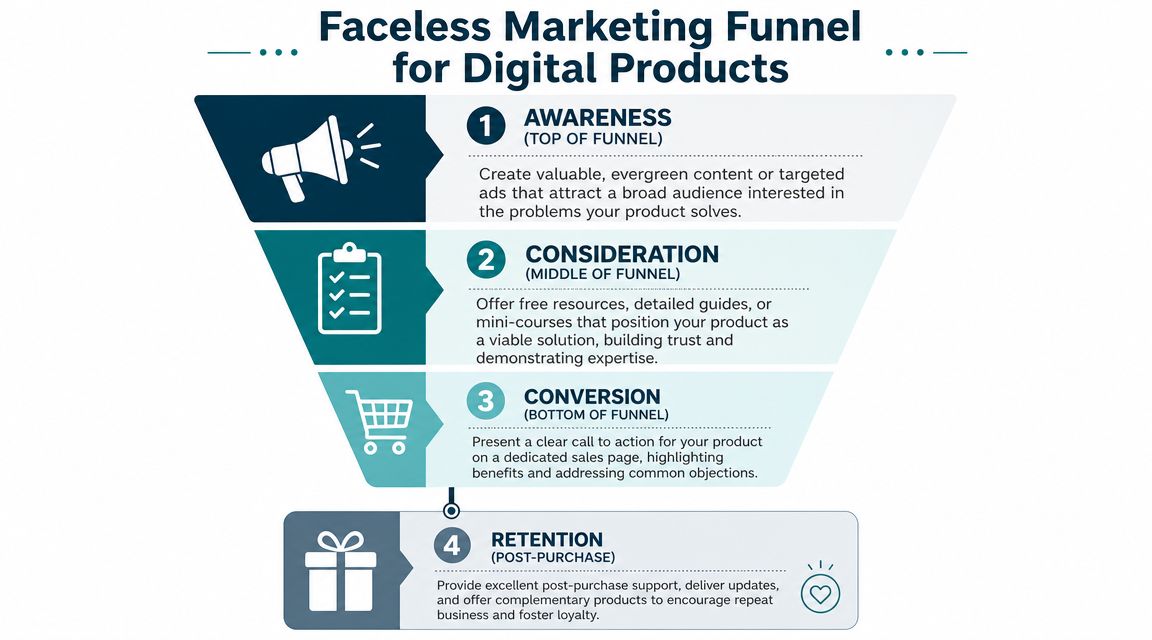
Useful channels include:
- Pinterest: Create pins tied to problem-aware searches and send them to your product page or related article.
- Blog posts: Write practical posts around questions buyers already ask, then link naturally to the product.
- YouTube: Publish niche tutorials or walkthroughs without making yourself the center of the brand.
- Communities: Answer relevant questions in Reddit threads, niche forums, or groups when your product is a good fit.
This approach is especially good for freelancers, designers, educators, and artists who want consistent distribution without building a personal-content machine.
Quiet marketing still works when the page matches the search and the offer solves the problem.
Track the signals that change decisions
Don't measure everything. Measure what helps you choose the next action.
For a simple digital product funnel, the useful questions are:
- Are people reaching the page?
- Are they clicking the purchase link?
- Which channels send useful traffic?
- Which product angles get attention and which get ignored?
A lightweight analytics setup is enough. If you use a page builder with built-in tracking, review page views, click activity, and traffic sources regularly. A practical example is tracking clicks on a bio link page, which shows how simple click data can reveal what people engage with.
Use the numbers to make decisions, not to admire dashboards.
If Pinterest sends visits but not clicks, the traffic may be too broad or the page promise may be weak. If blog traffic clicks well, make more articles around adjacent problems. If buyers hesitate on a template, add screenshots, an FAQ, or a short demo. Small changes tied to real behavior are what improve a digital product business over time.
That's the system needed. Validate demand first. Build the smallest useful solution. Sell from a clear page you control. Promote through channels that fit your energy. Then watch the signals and improve what buyers respond to.
If you want a simple place to publish a product page, portfolio, or compact sales hub without code, own.page gives you a clean way to build it from blocks, keep your branding consistent, and track how visitors interact with your links.
Free tools · no sign-up